Tag Archives: Birding Know How

Nature Centers 3! Birdsong Listening Stations in NE Mn

The day prior to the huge blizzard last week I finished up my work building BirdNET-Pi birdsong listening stations for three nature centers located in northeast Minnesota’s Boreal forest wilderness. All three stations are now live and listening, and you may check out and listen to the birds each station heard over the past 24 hours (or pick your own preferred time period). Each nature center is located within microphone listening distance of unique Boreal forest, lake and pond habitat

Select any one of these links to hear what birds are singing: (using a desktop or laptop computer for listening works MUCH better than a mobile device … learn more from a prior post of mine which also links the other listening stations)

I look forward to a continuing relationship as a volunteer for each of these organizations. As the snows melt this spring these stations, including some other stations located right on the North Shore of Lake Superior will provide a unique perspective of the northward bird migration status. I donated my time, knowledge and the entire cost of these Raspberry Pi Computers.

Some of this year’s research includes:

  • Bird Song academic curriculum development for children & teachers
  • Nesting sounds of the Common Loon parents and chicks
  • Identification of Connecticut Warbler habitat
  • ReUse or Not of Great Gray Owl Territory

This work also involves off the grid listening stations.

Locations of the online birdsong listening stations I have built and deployed. Learn more. (including the other listening links)
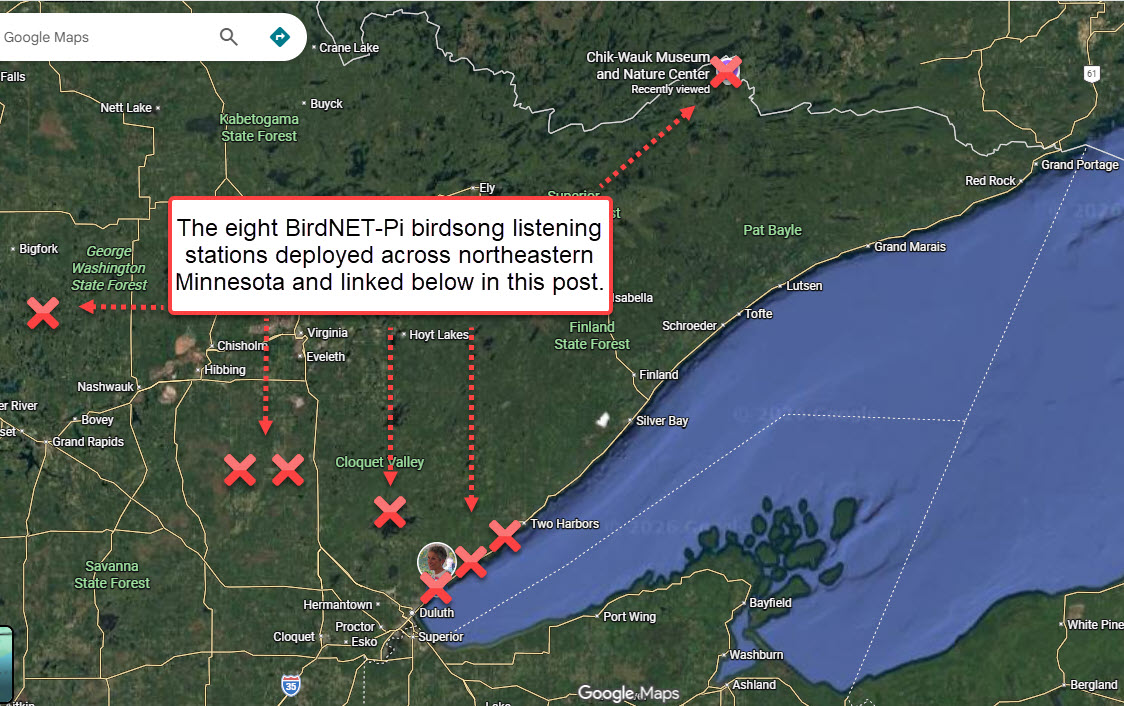

The graphic is from the other post. The birdsong listening stations are linked above, not below!
Rix Pocket K3 Thermal Monocular Used for Birding / Owling

This is the second in a series of posts about the my new Rix Pocket K3 with a native resolution of 384 x 288 thermal sensor.  This resolution is one step up from the more basic 256 x 192 thermal sensors. All posts will be linked to my initial post. Like all equipment reviews features on my website, I purchase everything with my own money and NEVER accept or seek paid endorsements. (browse to the first post in series/review with subsequent linked posts).

It is too early for me to form an opinion yet about my new thermal monocular. My sole purpose with this post is to provide my first efforts with the monocular taken by a beginner who really has no idea what he is doing.

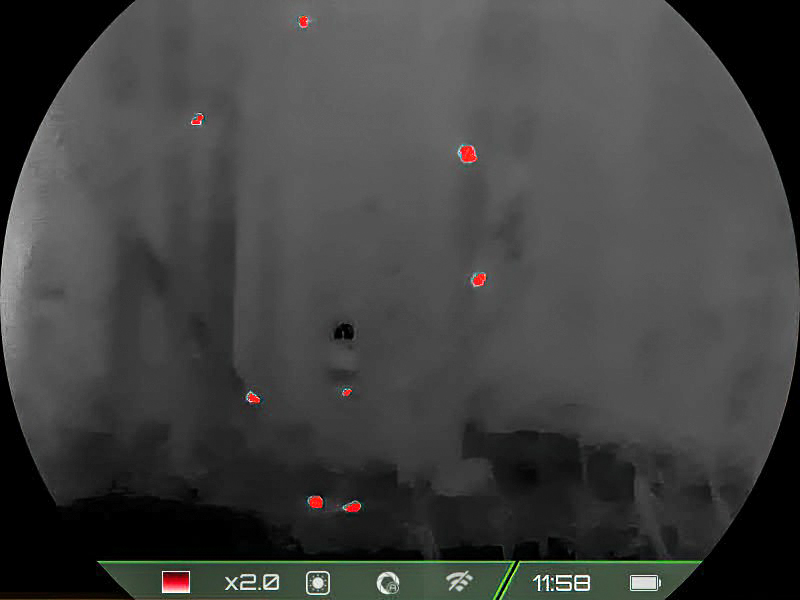
First Day’s Outing With Thermal … Up at the Greenwood Creek Birdfeeders in northern Minnesota …. habitat is deep wilderness where I maintain trailcams, listening stations and birdfeeders deep in the Boreal Forest. I was using “Red Hot” for this initial test.

Image (the “red blobs” are chickadees and blue jays. Video was taken from a distance of about 50 yards right before sunrise)

Video (link for blog email subscribers)


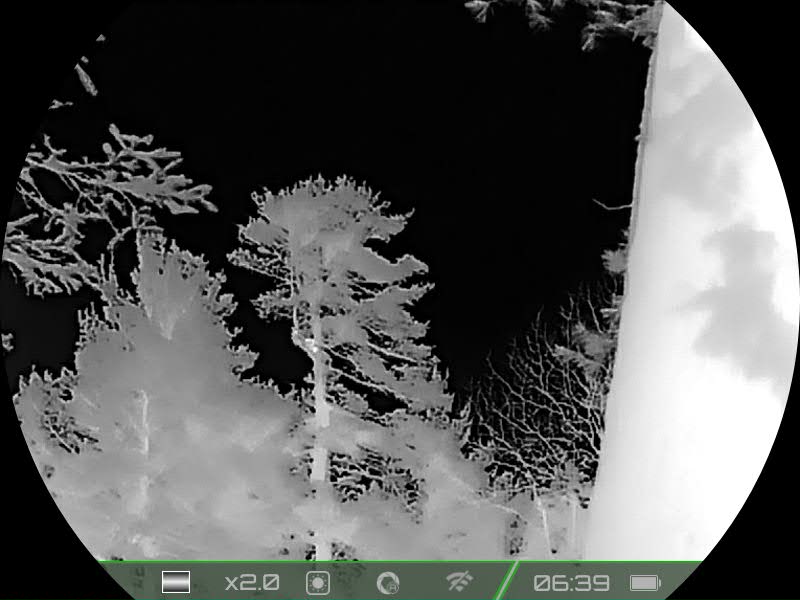
Second Day’s Outing With Thermal … Near my home in northern Minnesota …. habitat is deep white pine forest with a stream that flows down to Lake Superior which is about 1,000 yards distant. I was using “White Hot” for this test. The image and  video were taken 60 minutes before sunrise. It was pitch dark out, and I could not see the owls on my own. The temperature outside was 28F.

Image (The owl was behind the white pine’s trunk, and I could not pick it up with my new thermal. The only reason I figured out the owl was behind the trunk was because moments later it hopped out onto the branch … the movement was extremely obvious. See the video.)

Video (link for blog email subscribers)(The Great Horned Owl may be seen towards the middle bottom of the video. I believe it is the female who I named Amy many years ago. I have the monocular on its lowest, basic magnification (2x optical). I rarely zoom while scanning for two reasons: 1) I want as wide a field of view as possible for trying to locate birds. 2) Digital zoom on any device degrades the optical quality in my opinion)

BirdNET-Pi Birdsong Listening Device Settings

For anyone who has built a BirdNET-Pi (or has plans … see my post), this IS an extremely important post. I have built, configured and deployed many BirdNET-Pi’s for friends and nature centers in northeastern Minnesota. Given both my experiences with those birdsong listening devices and significant online research, I have BirdNET-Pi settings which I believe are optimal. Those settings are explained in this post along with annotated screenshots. The settings covered in this post are in the same order as those settings appear in BirdNET-Pi command structure: (settings not covered in this post use the Pi defaults)

You need to enter the default user name and password to enter the settings BirdNET-Pi menu options.

Basic Settings

  • Model: Species Occurrence Frequency Threshold
  • Location
  • BirdWeather
  • Notifications
  • Time and Date

Advanced Settings

  • Disk Management
  • Audio Settings
  • Options
  • BirdNET-Lite Settings

Annotated Settings Screenshots & Recommended Entries


Basic Settings Screenshot #1

  • Species Occurrence Frequency Threshold: Set to <.001>  or your Pi device will never pick up owls. The default number does not tend to record rarer species unless you make this change.
  • Enter and insure your <GPS coordinates> are correct. Get from Google Maps and confirm. Your Pi unit makes ID’s based upon geographic regions indicated by your GPS location.
  • If you want to have your BirdNET-Pi appear on Birdweather, you need to create a free account and get a <BirdWeather Token> for every Pi which you register.


Basic Settings Screenshot #2

  • There are no text based notifications for BirdNET-Pi devices, but you may configure email notifications via the Apprise Service. These notifications can be tricky to set up and are based upon Apprise. Learn more about Apprise via their knowledge wiki.
  • I change the notification title to words that make sense to me, and my device.
  • Select the notifications you desire. Choosing every new detection is NOT a good idea. Your email account will be overwhelemed.


Basic Settings Screenshot #3

  • Unless you have a paid Flickr account, use Wikipedia images for <Bird Photo Source>.
  • Make certain your time and date is correct. It will get used for your identifications. BirdNET-Pi does not have an on board clock. Without a network connection you will not record correct time and date information.


Advanced Settings Screenshot #1

  • A reader asked a question about the privacy settings. Birdnet-Pi defaults to “0%” upon installation (as shown). Whether the tiny computer ever captures human conversation and saves same is unknown to me. However, when I monitor the active logging function as the computer attempts to ID birds it always seems to successfully recognize humans as such, and throw those sound snippets away. In addition the sound snippets are very short, and the huge majority of these birdsong listening stations are not in very public places … thus not many humans around! However, if you deploy a station where lots of people congregate, which is actually a poor location for a bird feeder, you may wish to be more careful with this setting.
  • I like to set Disk Management to 80% full. As your PI unit makes birdsong recordings the SD card will fill up with audio files. While a person could set a purge to occur wen the disk is closer to 100% full, you risk having “swap files” which are utilized during the purge becoming corrupt due to lack of storage space.
  • I like to set the number of audio files kept per species at <10>. No number is right, or wrong but given the variations of bird calls I have selected this number. Pi keeps the top number of files requested based upon confidence level.


Advanced Settings Screenshot #2

  • If you wish to have your audio files uploaded to BirdWeather, you MUST select <flac> audio files (BirdWeather requirement because of storage limitations). You may NOT use MP3 files (you may easily convert at a later time).
  • I also like the extract to be 18 seconds in total duration (personal preference). Cornell’s underlying database, BirdNET, will only evaluate in 3 second chunks. I like a longer data file that I may use when listening to sound files. Note their recommendation for multiples of <3>.  Other multiples cause problems.


Advanced Settings Screenshot #3

  • The volunteer developers post frequent updates and bug fixes to the BirdNET-Pi software. Make certain you configure <automatic update>
  • BirdNET-Lite Settings dictate both the confidence level required for a bird to be recorded as a given species, and how the actual sound file will be utilized. The default <overlap> is zero, but I like to set a 1/2 second overlap. This means for a given data file of 18 seconds, the BirdNET-Pi software first evaluates the first 3 seconds, then moves back 1/2 second and starts a new evaluation from that point (2.5 seconds) … and so forth till the entire sound file is analyzed … thus the overlap term. Given birds do not sing in tandem with your devices “3 second chunks”, an overlap results in a potentially more correct match. Files (birdsongs) are less likely to be clipped off.
  • I have also increased the required confidence level to 75%. The default is 70″ for both Merlin and Cornell’s BirdNET (used by BirdNET-Pi). I like the higher confidence level which helps limit frequent “false positives”.


End of Blog Post